Tanks with Inventory Change Between Cases and Have no Inputs / Outputs
This analysis rule includes the list of tank elements that have a change in the measured inventory between the current Case and the previous case, and no inputs and outputs to account for the change. The inventory change can indicate that an input or output occurred but was not recorded, or an incorrect inventory change was recorded. After the choice of a mass or volume basis for the rule is made, the calculation examines the measured mass or volume for the tank. It also looks at the corrected mass or corrected volume if the manual correction Attribute flag is set to true. A threshold of zero means that the rule has not been configured. The threshold must be greater than zero for the rule to run.
The following table lists a sample log output for this analysis.
Sample Log
| Time | Severity | Element | Attribute | Message |
|---|---|---|---|---|
| 7/22/2005 13:15 | ...REPORTING TANKS WITH NO MEASURED VOLUME CHANGE BUT HAS INPUTS OR OUTPUTS - BASIS= MASS | |||
| 7/22/2005 13:15 | Warning | TankA | Current Case Attribute MeasuredMass: 1 (kg) , Previous Case Attribute MeasuredMass: 0 (kg) | |
| 7/22/2005 13:15 | Warning | TankB | Current Case Attribute CorrectedMass: 1 (kg) , Previous Case Attribute MeasuredMass: 0 (kg) | |
| 7/22/2005 13:15 | Warning | TankC | Current Case Attribute MeasuredMass: 1 (kg) , Previous Case Attribute CorrectedMass: 0 (kg) | |
| 7/22/2005 13:15 | Warning | TankD | Current Case Attribute CorrectedMass: 1 (kg) , Previous Case Attribute CorrectedMass: 0 (kg) |
Analysis Method
- Collect a list of all tank elements in the current Case that satisfy the following criteria:
- Status Attribute value is IS (In Service).
- Tanks Element has no inputs or outputs within the context of the Case time limits.
- For each tank, determine if the inventory change in volume or mass is outside of an allowable difference using the tests described below. The corrected value is used instead of the measured value if the manual adjustment flag value is 1 (True). If one of the two tests fails, the tank is flagged as suspect.
- Write to the log section of the case. Report the current Case mass\volume, the previous Case mass\volume and the difference between the two cases. The basis for measurement and the absolute and relative differences are noted.
Analysis Tests
For Mass basis
Test for absolute difference

Where:
mopen = the inventory (in mass) from the previous period
mclose = the inventory (in mass) from the current period
Test for relative difference

Where:
mopen = the inventory (in mass) from the previous period
mclose = the inventory (in mass) from the current period
Drel = the relative difference (in percent)
For Volume basis. All volumes (V) are in volume units at standard conditions
Test for absolute difference

Where:
Vopen = the inventory (in standard volume) from the previous period
Vclose = the inventory (in standard volume) from the current period
Test for relative difference

Where:
Vopen = the inventory (in standard volume) from the previous period
Vclose = the inventory (in standard volume) from the current period
Drel = the relative difference (in percent)
Configuration Using the Wizard
The configuration of the Tanks with Volume Change between Cases and Has no Inputs/Outputs is a selection of the General Gross Error Analysis Rule. You open the window for configuring the test (shown in the following figure) from the General Gross Error Analysis Rule Wizard.
Open the Gross Error Configuration window as described in Configuring - General Gross Error Analysis Rule.
On the Tanks tab, select Tanks with inventory change between Cases and no inputs/outputs.
A Tanks with inventory change and no inputs/outputs - Attributes window opens.
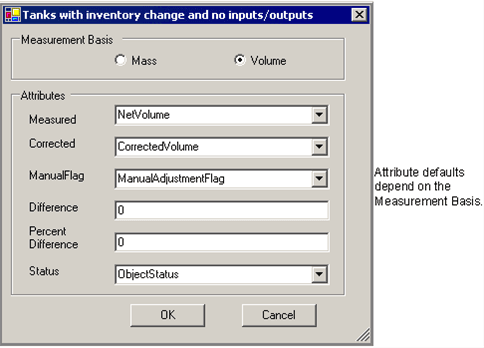
Select measurement basis and Attributes according to the following table:
Attributes
Selections Description Measurement Basis Select either mass or volume basis. Measured Tank inventory actual measurement. The default is to 'MassMeasurement' or 'NetVolume' depending on mass or volume selection. Corrected Tank inventory corrected measurement. The default is to 'CorrectedMass' or 'CorrectedVolume' depending on mass or volume selection. ManualFlag Flag to indicate if a corrected measurement was used for the tank inventory. The default is to 'ManualAdjustmentFlag'. Difference The absolute difference between the current and previous Case values for the density Attribute in the default unit of measure for the attribute. Status Tank in/out of service status. The default is to 'ObjectStatus'. Enter in a non-zero value for the absolute difference (in the engineering units of the measured value) and/or the percent difference between the value from the previous Case and the current Case value.
Leaving the value at zero for either difference or percent difference disables that test.
Click OK to finish the configuration.
The text "CONFIGURED" displays next to the 'Tanks with inventory change and no inputs/outputs' selection.
To run this test, see Running the General Gross Error Analysis.